Class `intData` examples
Catarina P. Loureiro
Source:vignettes/intData_examples.Rmd
intData_examples.RmdThis vignette provides examples of how to use the
intData class and related functions for handling
interval-valued data. The intData class is designed to
represent interval-valued data. The examples included here demonstrate
how to create intData objects, compute summary statistics,
and visualize interval-valued data using the
plot_pairs_int() function. The dataset used in these
examples is the Credit Card dataset, which is available in the
package and can be loaded using data("creditcard"). The
examples illustrate the basic functionalities of the
intData class and how to work with interval-valued data in
R.
For more details on the interval-valued data framework implemented in the package, please refer to Oliveira et al. (2025).
Credit Card Dataset
This dataset contains interval data of credit card expenses (Billard and Diday (2006)), including min-max values, centers and ranges, centers and logranges, and microdata. The aggregation of the microdata was done by person-month, resulting in observations. It is composed of variables:
- Food
- Social
- Travel
- Gas
- Clothes
The creditcard dataset includes the following
components:
-
microdata: A data frame with rows and columns. It contains the microdata, with individual measurements of each variable for all observations. -
min_max: A data frame with rows and columns. Each row corresponds to a different interval observation, and each column gives the minimum and maximum values for each variable. -
centers_ranges: A data frame with rows and columns. Each row corresponds to the centers and ranges of the interval data. -
intData: AnintDataobject with interval-valued observations and variables, constructed assuming the microdata follow symmetric triangular distributions.
data(creditcard)
CreditCard_microdata <- creditcard$microdata
CreditCard_min_max <- creditcard$min_max
CreditCard_CR <- creditcard$centers_ranges
There are different ways to create an intData object
from the dataset, depending on the assumptions about the latent
distribution of the microdata. In this example, we will create an
intData object using the min_max component of
the dataset, assuming a continuous uniform distribution for the latent
variables, which corresponds to the symmetric and i.d. case with
.
This is the default setting for the intData class.
credit_card_int_unif <- intData(CreditCard_min_max, Seq = "LbUb_VarbyVar",
                                VarNames = colnames(CreditCard_microdata)[3:7])

# Check the parameters of the latent distribution
credit_card_int_unif@LatentParam
#> [[1]]
#> [1] 0.08333333
Since the microdata are available, we can take a closer look at the
distribution of the latent variables. The get_latent_var()
function can be used to obtain the latent variables observed values, by
normalizing the microdata into the
interval. In this example, we will use the min_max
component of the dataset to normalize the microdata. The aggregation
criterion is by month and name, so we will create a new variable that
combines the name and month to use as the grouping variable. We can then
visualize the distribution of the latent variables using histograms and
density plots.
credit_agrby <- factor(paste(CreditCard_microdata$Name,CreditCard_microdata$Month, sep = "_"))
credit_card_U <- get_latent_var(CreditCard_microdata[,3:7], CreditCard_min_max, credit_agrby,
                                rownames(CreditCard_min_max), Seq = "LbUb_VarbyVar")

oldpar <- par(no.readonly = TRUE)
par(mfrow=c(1,5), mar=c(2, 2, 2, 1))
for (i in 1:5){
    hist(credit_card_U[,i], xlab = NULL, ylab = NULL,
            main = colnames(credit_card_U)[i], probability = TRUE)
    lines(density(credit_card_U[,i], na.rm = TRUE), col = '#009de0', lwd = 2)
}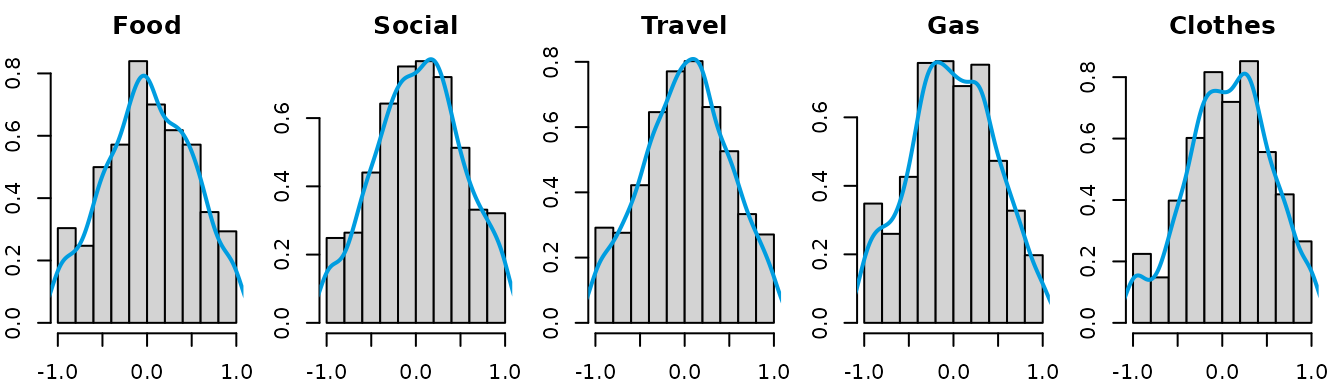
par(oldpar)After examining the distribution of the latent variables, we can
assume the distributions are approximately triangular and symmetric.
Then, we can create an intData object using the
min_max component of the dataset, specifying the latent
distribution as "Triang".
credit_card_int_triang <- intData(CreditCard_min_max, Seq = "LbUb_VarbyVar", LatentDist = "Triang",
                                    VarNames = colnames(CreditCard_microdata)[3:7])

# Check the parameters of the latent distribution
credit_card_int_triang@LatentParam
#> [[1]]
#> [1] 0.04166667

head(credit_card_int_triang)
#>                Food                Social                Travel                   Gas               Clothes
#> 1_1   [ 20.81  ,  29.38  ]  [  9.74  ,  18.86  ]  [ 192.33 ,  205.23 ]  [ 13.01  ,  24.42  ]  [ 44.28  ,  53.82  ]
#> 1_2   [ 21.44  ,  29.18  ]  [ 10.86  ,  18.01  ]  [ 214.98 ,  229.63 ]  [ 16.08  ,  22.86  ]  [ 40.51  ,  53.57  ]
#> 1_3   [ 20.78  ,  29.09  ]  [ 11.19  ,  19.87  ]  [ 183.12 ,  197.17 ]  [ 17.96  ,  27.65  ]  [ 42.97  ,  58.62  ]
#> 1_4   [ 20.82  ,  29.18  ]  [  4.48  ,  15.15  ]  [ 169.49 ,  185.75 ]  [ 13.83  ,  23.73  ]  [ 44.93  ,  55.08  ]
#> 1_5   [ 21.72  ,  28.48  ]  [  8.24  ,  18.88  ]  [ 132.71 ,  146.96 ]  [ 13.97  ,  26.59  ]  [ 64.96  ,  74.60  ]
#> 1_6   [ 19.90  ,  28.63  ]  [  6.88  ,  19.71  ]  [ 134.48 ,  146.11 ]  [ 16.50  ,  24.64  ]  [ 40.91  ,  55.80  ]
The intData object contains the centers and ranges of
the interval data, as well as the parameters of the latent distribution.
The centers and ranges can be accessed using the @Centers
and @Ranges slots, respectively, while the lower and upper
bounds can be obtained using the LowerBounds() and
UpperBounds() functions.
credit_card_int_triang@Centers[1:5,]
#>     Food.Centers Social.Centers Travel.Centers Gas.Centers Clothes.Centers
#> 1_1       25.095         14.300        198.780      18.715          49.050
#> 1_2       25.310         14.435        222.305      19.470          47.040
#> 1_3       24.935         15.530        190.145      22.805          50.795
#> 1_4       25.000          9.815        177.620      18.780          50.005
#> 1_5       25.100         13.560        139.835      20.280          69.780
credit_card_int_triang@Ranges[1:5,]
#>     Food.Ranges Social.Ranges Travel.Ranges Gas.Ranges Clothes.Ranges
#> 1_1        8.57          9.12         12.90      11.41           9.54
#> 1_2        7.74          7.15         14.65       6.78          13.06
#> 1_3        8.31          8.68         14.05       9.69          15.65
#> 1_4        8.36         10.67         16.26       9.90          10.15
#> 1_5        6.76         10.64         14.25      12.62           9.64
LowerBounds(credit_card_int_triang)[1:5,]
#>     Food.Lbnd Social.Lbnd Travel.Lbnd Gas.Lbnd Clothes.Lbnd
#> 1_1     20.81        9.74      192.33    13.01        44.28
#> 1_2     21.44       10.86      214.98    16.08        40.51
#> 1_3     20.78       11.19      183.12    17.96        42.97
#> 1_4     20.82        4.48      169.49    13.83        44.93
#> 1_5     21.72        8.24      132.71    13.97        64.96
UpperBounds(credit_card_int_triang)[1:5,]
#>     Food.Ubnd Social.Ubnd Travel.Ubnd Gas.Ubnd Clothes.Ubnd
#> 1_1     29.38       18.86      205.23    24.42        53.82
#> 1_2     29.18       18.01      229.63    22.86        53.57
#> 1_3     29.09       19.87      197.17    27.65        58.62
#> 1_4     29.18       15.15      185.75    23.73        55.08
#> 1_5     28.48       18.88      146.96    26.59        74.60
Alternatively, we can create an intData object using the
centers_ranges component of the dataset, which contains the
centers and ranges of the interval data. As for the latent variables’
parameters, since we have the microdata available, another option is to
estimate the parameters directly based on the microdata by setting
LatentCase = "General" and LatentDist = "KDE"
to use a kernel density estimation for the latent distribution. In this
case, it is necessary to specify the Umicro argument, which
contains the normalized microdata values.
credit_card_int_KDE <- intData(CreditCard_CR, Seq = "AllCen_AllRng",
                                VarNames = colnames(CreditCard_microdata)[3:7],
                                LatentCase = "General", LatentDist = "KDE", Umicro = credit_card_U)

# Check the parameters of the latent distribution
credit_card_int_KDE@LatentParam
#> [[1]]
#>           [,1]      [,2]      [,3]      [,4]      [,5]
#> [1,] 0.2385710 0.2266593 0.2234636 0.2237180 0.2198639
#> [2,] 0.2266593 0.2336648 0.2210776 0.2208769 0.2183596
#> [3,] 0.2234636 0.2210776 0.2277094 0.2183420 0.2143626
#> [4,] 0.2237180 0.2208769 0.2183420 0.2293551 0.2129321
#> [5,] 0.2198639 0.2183596 0.2143626 0.2129321 0.2220598
#>
#> [[2]]
#>            [,1]      [,2]      [,3]        [,4]       [,5]
#> [1,] 0.01970377 0.0000000 0.0000000  0.00000000 0.00000000
#> [2,] 0.00000000 0.0353448 0.0000000  0.00000000 0.00000000
#> [3,] 0.00000000 0.0000000 0.0151136  0.00000000 0.00000000
#> [4,] 0.00000000 0.0000000 0.0000000 -0.01665365 0.00000000
#> [5,] 0.00000000 0.0000000 0.0000000  0.00000000 0.07370565
In the majority of the cases, the macrodata has to be constructed
from the microdata. The micro2intData() function can be
used to create an intData object from the microdata, by
aggregating the microdata according to a specified criterion. In this
example, we will aggregate the microdata by month and name, using the
same grouping variable created earlier. We will also specify the latent
distribution as "General" to estimate the parameters based
on the microdata. If the LatentCase argument is omitted, it
assumes the latent distribution is uniform (i.d. and symmetric), which
is the default setting for the intData class. It is also
possible to specify the latent distribution, as seen in the previous
examples.
credit_card_int_agr <- micro2intData(CreditCard_microdata[,3:7], credit_agrby, LatentCase = "General")

# Check the parameters of the latent distribution
credit_card_int_agr@LatentParam
#> [[1]]
#>           [,1]      [,2]      [,3]      [,4]      [,5]
#> [1,] 0.2385710 0.2266593 0.2234636 0.2237180 0.2198639
#> [2,] 0.2266593 0.2336648 0.2210776 0.2208769 0.2183596
#> [3,] 0.2234636 0.2210776 0.2277094 0.2183420 0.2143626
#> [4,] 0.2237180 0.2208769 0.2183420 0.2293551 0.2129321
#> [5,] 0.2198639 0.2183596 0.2143626 0.2129321 0.2220598
#>
#> [[2]]
#>            [,1]      [,2]      [,3]        [,4]       [,5]
#> [1,] 0.01970377 0.0000000 0.0000000  0.00000000 0.00000000
#> [2,] 0.00000000 0.0353448 0.0000000  0.00000000 0.00000000
#> [3,] 0.00000000 0.0000000 0.0151136  0.00000000 0.00000000
#> [4,] 0.00000000 0.0000000 0.0000000 -0.01665365 0.00000000
#> [5,] 0.00000000 0.0000000 0.0000000  0.00000000 0.07370565

head(credit_card_int_agr)
#>                 Food                Social                Travel                   Gas               Clothes
#> 1_1    [ 20.81  ,  29.38  ]  [  9.74  ,  18.86  ]  [ 192.33 ,  205.23 ]  [ 13.01  ,  24.42  ]  [ 44.28  ,  53.82  ]
#> 1_10   [ 18.24  ,  29.75  ]  [  9.24  ,  17.57  ]  [ 173.76 ,  187.12 ]  [ 15.25  ,  23.75  ]  [ 43.05  ,  57.34  ]
#> 1_11   [ 16.91  ,  28.85  ]  [  8.65  ,  19.03  ]  [ 173.12 ,  187.30 ]  [ 15.09  ,  23.54  ]  [ 41.85  ,  55.70  ]
#> 1_12   [ 17.80  ,  27.67  ]  [  7.33  ,  19.06  ]  [ 171.71 ,  191.47 ]  [ 14.91  ,  25.97  ]  [ 41.54  ,  57.18  ]
#> 1_2    [ 21.44  ,  29.18  ]  [ 10.86  ,  18.01  ]  [ 214.98 ,  229.63 ]  [ 16.08  ,  22.86  ]  [ 40.51  ,  53.57  ]
#> 1_3    [ 20.78  ,  29.09  ]  [ 11.19  ,  19.87  ]  [ 183.12 ,  197.17 ]  [ 17.96  ,  27.65  ]  [ 42.97  ,  58.62  ]
Now that we have created the intData object, we can, for
instance, compute the symbolic covariance and correlation matrices of
the interval data using the int_cov() function.
credit_card_cov <- int_cov(credit_card_int_agr)
credit_card_cor <- cov2cor(credit_card_cov)

# Check the covariance matrix
credit_card_cov
#>              Food     Social      Travel         Gas     Clothes
#> Food    19.311563  1.0362555    4.753931  -9.3001616   54.408201
#> Social   1.036255  2.3969207   12.755943   0.8241657    3.661854
#> Travel   4.753931 12.7559432  567.525646  21.2722637 -136.381036
#> Gas     -9.300162  0.8241657   21.272264  28.0447659  -85.604729
#> Clothes 54.408201  3.6618540 -136.381036 -85.6047285  576.922703
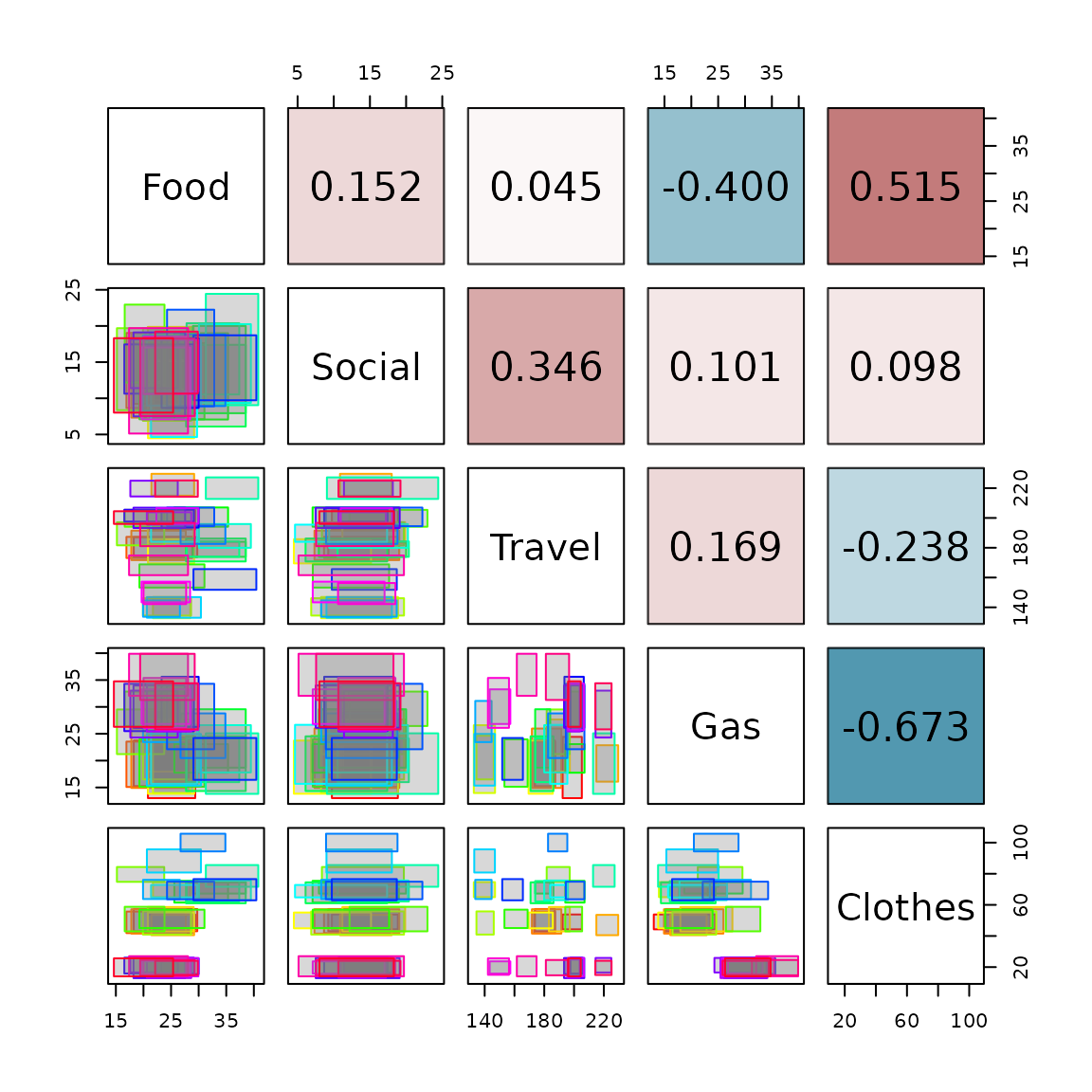
Finally, we can visualize the interval data using the
plot_pairs_int() function, which creates a pairs plot for
interval-valued data. The lower triangular shows scatter plots of the
variables, while the upper triangular shows the interval correlation
matrix.
plot_pairs_int(credit_card_int_agr, type = "rectangles",
                    corr = credit_card_cor, labels = colnames(credit_card_int_agr))